
Sarah Baisley reports on her experiences at Annecy 2006 where the MIFA market showcased more excitement than the festival.

SIGGRAPH travels to the U.S. East Coast for 2006.
Well, just as we expected, SIGGRAPH 2006 was much smaller and more intimate in Boston earlier this month. Even so, it was still a whirlwind of activity for the nearly 20,000 gathered at the new Boston Convention Center. Exhibitors and other attendees werent complaining: it was reminiscent of SIGGRAPH of old, with plenty of interest and passion from pros and students alike, and productive recruiting too.
While there were no flashy buzzwords to sum up the show this time around, two descriptions tossed around were Matchmaking and Pipeline Ability: a clear indication that the industry is still trying to contend with making production easier and more cost-efficient and artist-friendly.
The Autodesk Roadmaps
With that mind, Autodesk announced Maya 8 (to be released later this month) and 3ds Max 9 (scheduled for October) with the intent of improving productivity and interoperability while easing industry anxieties about the future of Maya since last years acquisition of Alias. The respective three-year roadmaps for Max and Maya remain intact, according to Autodesk, and the development teams continue to be separate, with the goal of making Max and Maya more complementary and pipeline efficient.
This went over well with the user group meeting, despite fears of the eventual demise of Maya or consolidation into one package along with Max and MotionBuilder. We are not killing Maya and Max or combining them, insisted Rob Hoffmann, senior Product Marketing manager, 3D Media & Ent. division.
Maya 8 offers a combination of 64-bit support, multithreading and algorithmic optimizations that enable artists to load massive datasets and interact with them more efficiently. Key areas of the software, including skinning, draw tessellation and subdivided polygon proxy meshes, have been multi-threaded to scale with the number of processors or cores available.
Maya 8 additionally offers a host of productivity advancements, particularly for modeling and texturing. The Transfer Polygon Attributes feature enables modelers to transfer UVs, color per vertex (CPV) and vertex position information between surface meshes of differing topologies. This is particularly useful when working with two different versions of an object or character, e.g. one that is high-resolution and one that is low-resolution. In addition, new and improved workflows and tools such as Polygon Bridge, multiple edge loop insertion and enhanced UV layout help maximize productivity for the most common tasks.
Maya 8 enables artists to better manage data when using multiple 2D and 3D packages within the production pipeline. This is achieved through application programming interface (API) extensions, enhancements to Autodesk FBX file exchange technology, the addition of interchangeable geometry caching between Maya and Autodesk 3ds Max animation software, and new interoperability with Autodesk Toxik collaborative compositing software.
Autodesk anticipates that Maya 8 will be available in English in August, and in additional languages in the future. The 64-bit version of Maya 8 will be supported on Windows and Linux. The 32-bit version will be supported on Windows, Linux and Mac OS X.
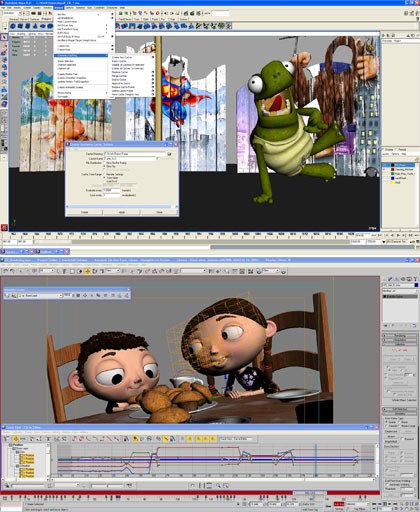
Autodesk needs little effort to highlight its industry leading Maya 8 and 3ds Max 9 software. © Autodesk.
Autodesk will sell Maya 8 for $1,999 for Maya Complete (Standalone) and $6,999 for Maya Unlimited (Standalone). The upgrade price from Maya 7 Complete to Maya 8 Complete is $899, and the upgrade price from Maya 7 Unlimited to Maya 8 Unlimited is $1,249.
In regards to 3ds Max 9, Autodesk has focused on addressing the challenges of working with larger amounts of complex data, as well as scaling to bigger production teams. Digital artists using 3ds Max 9 will gain improvements in core performance, productivity and pipeline efficiency.
3ds Max 9 softwares 64-bit architecture makes it easier to work with the huge datasets required for next-generation digital content creation. Rendering is also greatly improved with the mental ray 3.5 rendering core.
3ds Max 9 features include:
-
A layered blending system that can be added to custom rigs and controllers within 3ds Max.
-
Optimizations in wireframe and edge display, enabling faster feedback within the viewport.
-
XAF files that can be saved and loaded onto bipeds, allowing for easy transfer of information to and from custom rigs.
-
Enhanced hair and cloth, including the ability to style hair in the viewport.
-
Improved file referencing and tracking of work-in-progress assets.
-
Point cache 2, which allows artists to bake mesh deformations into a file for faster rendering.
- Improved compatibility with Autodesk Maya via the FBX file format.
Meanwhile, to foster collaboration and networking among the Autodesk 3D community the Media & Ent. division will launch a new community portal on Aug. 22 called The Area (www.the-area.com). Autodesk will provide content as appropriate and support the ongoing development of the site, but the goal is for the community to generate and own most of the content.
Initially, the site will focus on content created using Maya, Max, MotionBuilder or VIZ used in games, film, post-production or design visualization. Membership is free.
The site will include:
-
Tips & Tutorials for beginner, intermediate and advanced users.
-
Downloads for product trials, textures and shaders, plug-ins and scripts.
-
Showcase that will include image and movie galleries, member portfolios and Behind the Screenz, a section containing stories focused on artists and developers.
-
Blogs from Autodesk product development as well as community members.
- Discussion forums focused on various topics beyond technical support.
Features will include advanced search capabilities, profiles and the ability to rate and comment on tips/galleries.

Softimage announced an update to its Face Robot software, but is the price tag still a stumbling block? © Softimage.
Redefining Character Animation for Softimage
Not to be outdone, Softimage is focused on redefining character animation and rebranding the company in honor of its 20th anniversary. Earlier in July, parent company Avid acquired Character Animation Technologies (CAT), which provides plug-ins for Max (and will launch CAT 2.5). This broadens the range of XSI and Face Robot with greater access to multiple 3D platforms.
At SIGGRAPH, Softimage announced Face Robot 1.5, an update to the industrys first software application dedicated to the creation of lifelike facial animation. This release offers a game export solution which allows artists to deliver high quality, in-game acting with detailed facial nuances, with support for all major game platforms.
Key features of the game export solution include:
-
Automatic enveloping: Careful preservation of facial nuances around the mouth, with added focus on the volumetric quality of the lips even with a minimal number of bones.
-
Paint-based exporting: Artists can dictate the level optimization of anything from the number of masks, through to bone locations and influence.
-
Tuning of realtime data: Easy adjustment of wrinkle intensity and shading parameters after export.
- Support for custom deformation: Its now possible to add layers of customized rigging, shape and simulation and then export them.
The Face Robot 1.5 software application has been optimized to dramatically speed up animation playback while maintaining the highest quality deformations. Since the majority of animation tuning occurs around the mouth, particular attention has been taken to optimize the proxy mouth playback mode.
Face Robot 1.5 software is expected to be available in September for purchase in the following configurations:
-
Face Robot Designer will be available for $94,995
- Face Robot Animator will be available for $14,995

Movas Contour motion capture system was the talk of the show. © Mova.
Contour Reality Capture
In addition, Face Robot is the first third party app to read data from the new Contour Reality Capture system from San Francisco-based Mova. Contour was one of the surprise highlights of SIGGRAPH 2006, attracting lots of attention to its booth.
Contour employs two separate-yet-synchronized camera systems to simultaneously record visual and geometric information of actors wearing special phosphorescent green makeup. These two sets of data are combined to result in a high-resolution 3D digital image. With this innovative, markerless, optics-based process, every subtle detail of a human performance from an arching eyebrow to widening eyes to a sly smile is recorded in realtime.
Contours high-definition, 3D, volumetric representation of the action can be imported, modified, manipulated or retargeted to other characters using off-the-shelf CG animation software. Contour can import true human behavior in all its distinct complexity into the virtual realm and works well with both marker-based motion capture and keyframe animation systems.
Contour captures the motion of any 3D surface, deformable or not, with sub-millimeter precision at up to 120 frames per second, at a resolution of more than 100,000 polygons per frame. It captures the intricacies of soft tissue motion, like pursing lips or billowing fabric.
The Uncanny Valley is a perceptual zone where a computer-generated faces approach photorealism just enough to be eerie, stated Mova founder/president Steve Perlman. Contour is the first technology to successfully cross the Uncanny Valley and open the door to a whole new realm of creative opportunities.
Contour is the first system weve seen that provides such high-resolution motion data in a practical production environment, and SOFTIMAGE|XSI and Face Robot are the ideal production tools for working with Contour, said Marc Stevens, vp/gm of Softimage Co. The high-quality motion data provided by Contour will allow Face Robot to produce facial animation with unprecedented realism. Together, our systems will enable a powerful new end-to-end facial animation pipeline for both film and game production.
Contours performance is enabled in part through collaboration with NVIDIA. Generally, NVIDIA GPUs are used to accelerate the rendering and display of 3D scenes. However, in the Contour system, NVIDIA GPUs are being used for the first time to accelerate the capture of 3D scenes, bringing details of the real world into the digital realm with unprecedented fidelity, said Jeff Brown, gm of professional products at NVIDIA.
Through collaboration between Mova and Vicon, Contours markerless capture system can be used simultaneously with the Vicon MX-series marker-based capture system. This makes it possible for Contours cameras to capture high-resolution surface motion, such as facial, skin and cloth motion, while Vicons MX40 cameras capture high-precision marker motion, such as skeletal and prop motion.
Contour will be offered in the fourth quarter and director David Fincher has already announced that he will be using it on his next movie, The Curious Case of Benjamin Button, the reverse aging fantasy starring Brad Pitt. Perlman suggested that this represents the perfect use of Contour.
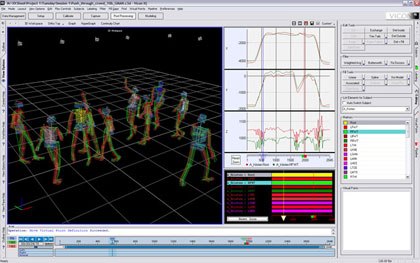
Vicon iQ software features intelligent fitting algorithms. © Vicon.
New MoCap Innovations From Vicon
Speaking of Vicon, it debuted a new MoCap software solution that provides a single unified and future-looking toolset that supports the growing demands of realtime motion capture, full performance capture and on-set visualization, and makes processing and applying motion capture data for the 3D animation pipeline simpler and more direct.
The software includes the following capabilities and advancements:
-
Scalable realtime motion capture: Connect and scale up systems to handle todays ever-increasing camera counts and amounts of data. Manage multi-person capture shoots and realize radical improvements for realtime capture.
-
Fast and efficient, kinematic solving and re-targeting: Bring clean and accurate motion data rapidly to a 3D application with the flexibility of House of Moves Diva software and the intelligent fitting algorithms of Vicon iQ.
-
Post-processing for full performance capture: Batch and farm. Handle large quantities of facial, finger and body marker information derived from multiple performers and longer scenes. Tap into a completely customizable motion capture scripting engine that is deeply entrenched in the industry.
-
On-set playback and visualization tools: Immediately visualize and verify results and how they work with other elements with realtime display of rendered characters meshes and lighting effects, video synchronization, audio and video camera overlay.
- Enhanced system setup: Streamline everything from system configuration to troubleshooting with enhanced intuitive management and control.
The new Vicon software can be configured as a simpler tool for smaller motion capture departments, or as a highly customized and hardware-scalable tool for very large studio uses. Key enabling capabilities include support for realtime playback of video and motion capture data, with fully rendered and lit digital characters either side-by-side with or composited over video. The software will also enable customers to replicate the point of view of video or reference cameras.
The Vicon software will be available in October as an upgrade to existing Vicon customers, and to new Vicon MX customers.
Meanwhile, the number of cameras for all-CG movies has increased from 64 on The Polar Express to 100 on Monster House to 200 on Beowulf. At the same time, volume size and density of character capture move quickly for production.
The latest line of cameras break up software to chain them in parallel and combine them later in smaller format, as animation gets closer to the MoCap stage. First unit Mocap of the kind ILM developed in-house for Dead Mans Chest is being targeted for the future.
NVIDIA debuted the Plex 1000, the latest in its Quadro line. © NVIDIA.
NVIDIA Introduces Quadro Plex 1000 Visual Computing System
In addition to unveiling Gelato 2.1, NVIDIA premiered the Quadro Plex 1000, touted as the first external dedicated Visual Computing System (VCS). Dubbed by one as the rebirth of SGI, the Quadro Plex offers advanced scalability in a sleek desktop or dense 3U rackmount configuration for demanding professional applications such as those powering multiple streams of 4K high-definition video, 3D styling and design, scientific and medical visualization, oil and gas exploration or visual simulation and training. People are constrained by graphics capabilities this removes the constraints.
Featuring NVIDIA SLI multi-GPU technology, the Quadro Plex is an external visual compute system delivering:
-
Massive density of up to 20x when compared to traditional GPU solutions
-
Performance of up to 80-billion pixels/sec and seven billion vertices/sec
-
Resolutions as high as 148 megapixels on 16 synchronized digital-output channels and eight HD SDI channels
- Scalability beyond current solutions, offering multiple configurations ranging from a single system to a cluster to further scale system ability
The Quadro Plex 1000 is compatible with an officially certified set of x86 32- and 64-bit Intel and AMD processors running Windows and Linux operating systems. Quadro Plex is planned to be certified on all industry-leading applications and ship in September, with prices starting at $17,500.
Demos by GeoProbe (oil drilling data in 3D) revealed Design & Context applicability, while 3D mapping by Google Earth of before and after shots of Lebanon offered the power of 3D detail.
New features in Gelato 2.1 GPU-accelerated, final-frame rendering software include:
-
Easier texture baking and full support for Maya bake sets.
-
Faster ray tracingan average 30% improvement over Gelato 2.0 with a smaller memory footprint for dense polygon meshes.
-
Improved stereo rendering features a new off-axis projection mode and a better anaglyph (red/blue) display in the image viewer.
-
A modified Mango plug-in supports Maya 8, 64-bit Maya, additional Maya shader nodes and volumetric effects from spotlight cones, texture bake sets and rendering of components.
-
Windows 64-bit support for Gelato Pro rendering software.
- Powerful Sorbetto technology relighting feature in Gelato Pro software now offers interactive adjustment of camera parameters, including depth-of-field and stereo controls and support for dynamic shadows.
Gelato 2.1 is in beta testing, with commercial release planned for this fall. As with earlier versions of Gelato software, the basic version of Gel ato 2.1 software will be available at no charge to users. The Gelato 2.1 Pro software, which incorporates advanced scalability and support features for advanced production pipelines, is available for purchase.
Gelato 2.1 and Gelato Pro software support the Windows XP and Linux operating systems and run on NVIDIA GeForce 5200 or higher graphics, or any NVIDIA Quadro FX solution. Gelato Pro software, however, is certified and supported only on NVIDIA Quadro FX boards.
Gelato software is available for download at the website; Gelato Pro software is priced at $1,500 and available from NVIDIA at store.nvidia.com and from authorized regional resellers. Maintenance and support contract renewals are $300 per license at the end of the first year of ownership.
Coinciding with the announcement of the Gelato 2.1 beta is of the launch of Gelato Zone (www.nvidia.com/gelato), a new online community for artists and animators. The new Gelato Zone website offers visitors valuable support and training information for Gelato software, tips and tricks to optimize and enhance the product, and technology blogs from the Gelato software development team, providing firsthand advice and advanced 3D rendering tips and techniques for Gelato rendering software.

Luxologys modo 202 offers a significant update over 201. © Luxology.
Grand Visions for the Future
Meanwhile, in light of the recent AMD acquisition of ATI, in which the processing prowess of the former would be combined with the graphics capabilities of the latter, we can expect a whole new line of platforms in the not too distant future. These platforms would range from general purpose to data-centric to graphics centric to media centric. However, AMD insists that it will continue its relationship with NVIDIA as part of a commitment to an open platform, while ATI still supports Intel, offering customer choice, new opportunities and its own commitment to open standards.
In other software news, Luxology launched modo 202, an update to its 3D modeling, painting and rendering software. Boasting a peak rendering speed that is more than 40% faster than modo 201, registered modo 201 customers can upgrade to modo 202 free of charge, and a free 30-day full-featured evaluation version is now available for download from the website.
modo 202 is a significant advancement towards our grand vision for modo, stated Luxology president/co-founder Brad Peebler. We built modo from the ground up to integrate modeling, painting and rendering in a way that dramatically improves workflow for 3D designers in all disciplines. modo 202 refines this development one step further, allowing artists to focus even more on creating and less on process and repetitive steps.
modo 202s new and improved features include:
-
Rendering: In addition to a speed increase, the rendering workflow is streamlined by improvements to the render window, including a convenient way to interactively adjust gamma display and a handy way to flip between 10 images for render review. The render window now provides an editable Limited Region control for quickly rendering a specific portion of the image. Soft shadows can now be generated from point and spot lights. Faster, more accurate image map re-sampling improves final image generation, and irradiance caching improvements substantially elevate global illumination quality and performance.
-
Modeling: Enhancements include a new create SubDiv option for the popular Pen tool, and a thicken tool for adding inner or outer thickness to geometry. A totally new object-to-object baking capability captures the surface detail of a complex object and automatically applies it to a simpler object for realtime applications. New game and unitless grids further increase modos suitability for modeling game assets. A new bounding box display option for geometry facilitates the manipulation of large datasets. UV editing operations are expedited in modo 202 with a new filled UV display mode that highlights unwanted overlaps in the UV editor. A new interactive UV relax with a pinning feature greatly simplifies the process of untangling overlapping UVs.
-
Painting: 3D painting behavior is improved when working on challenging areas such as folded UVs and along UV borders. 3D painting workflow is also bolstered with a new visible image ink display model, which lets artists place an image over a model and brush the image onto an underlying model. A new image ink stamp mode speeds the interactive rapid placement of logos, dirtmaps, scars or other images on the surface of models.
- Improved workflow: Enhancements include the ability to see scene lights in Advanced OpenGL, and to interactively adjust the F-Stop, focal length and focal distance of cameras. Support for Autodesk FBX and X3D formats are extended for expanded interoperability with other 3D applications.
modo 202 is priced at $895. Users with earlier versions of modo can upgrade directly to modo 202 for $395. modo 202 is available through Luxology and its worldwide reseller partners on both the Windows and Mac OS X platforms.
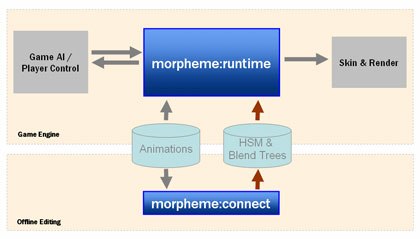
morpheme:runtimes pipeline chart. © NaturalMotion.
NaturalMotion showed off euphoria, its cutting edge run-time Dynamic Motion Synthesis technology that is being used in several next-gen games, including LucasArts Indiana Jones 2007 (working title); and endorphin 2.6, the newest version of its 3D character animation software. The company also announced morpheme, a powerful new animation engine for next-generation game development. Featuring a flexible and unique 3D authoring tool chain, morpheme is designed to give animators unprecedented creative control over the look of their final in-game animation by allowing them to author and preview blends, transitions and logic in realtime. morpheme will be available in October on PlayStation 3, Xbox 360 and PC.
morpheme consists of two components: morpheme:runtime and morpheme:connect. morpheme:runtime is a run-time engine that ships with full source code. morpheme:connect is a 3D authoring application that allows animators to graphically author blend trees and transition logic (based on Hierarchical Finite State Machines), modify and edit parameters through sliders and view the results in realtime. morpheme is designed as a flexible and open system and does not require the licensing of any other product. morpheme is also designed to seamlessly integrate with other leading 3D animation software and middleware technologies, such as physics engines.
morpheme is about raising the quality of in-game animation by providing intuitive, graphical control and a flexible programming framework, said Torsten Reil, ceo of NaturalMotion. With morpheme, animators and programmers can work hand-in-hand to create in-game animation that truly reflects the quality of the source data. morpheme is also designed to run fully integrated with our flagship DMS technology, euphoria, which allows players to experience unique moments every time they play a game.
Key features include:
morpheme:runtime
- lightweight run-time animation engine
- optimized for PlayStation 3, Xbox 360 and PC
- fully customizable blend nodes
- full hierarchical state machine
- IK support
- rigid body dynamics support
- euphoria support
- full source code supplied
morpheme:connect
- modern, fully scriptable application
- 2D and 3D viewports for authoring and visualization
- graphical authoring of transition graphs and blend trees
- realtime manipulation through sliders and other UI elements
- support for live game pad control
- script support (Lua)
- fully extensible through plug-ins
- euphoria support

Massive has moved from a visual effects tool into being used on animation productions like Renaissance. Massive image © Massive Inc. Renaissance image © Onyx Films/ Millimages/ Luxanimation/ Timefirm Ltd./ France 2 Cinema.
Refinements for the Present
Massive Software demoed version 2.6 of its artificial life-based 3D animation software, which is now shipping. Version 2.6 builds on Massives Academy Award-winning technology, providing increased pipeline flexibility, expanded rendering options and smarter agents that allow studios of any size and scope to create highly realistic and emotive performances using autonomously responding characters.
Lately Massive has been adopted for animation (Happy Feet, The Ant Bully and Renaissance) with very successful results, according to founder Stephen Regelous. It works really well with keyframe, better than MoCap. Its cleaner with better transitions. Massive offers an artist interface for creating reactions and responses earlier on in production, and characters are now closer to the camera. For Ant Bully, subdivision support was very helpful. Regelous was actually unaware of Massives use in Renaissances urban shots, since the filmmakers required no support. He said even Pixar is now using Massive.
Key features of the Massive 2.6 release include:
-
Fast and efficient rendering on the GPU: The new integrated Velocity renderer is able to render epic shots at film quality up to 30 times faster than supported software renderers. Massive 2.6 also lets customers use their own custom shaders.
-
Render Passes enables flexible pipeline integration: Now Massive agents can be assigned render attributes and shader visibility on a per-render basis, allowing customization of how Massive handles render attributes such as ambient occlusion, shadow pass, depth pass, etc.
-
More detailed characters: Support for sub-division geometry allows higher-quality geometry so that characters close to the camera can be rendered in greater detail.
- Smarter Agents: Enhancements to Massive Smart Stunts expand whats possible in a digital stunt. Artists can now create hybrid stunts with increased realism by applying Smarts Stunts to specific parts of a Massive agent. With the new grab constraint agents can grab objects, other agents and even climb rope.
At SIGGRAPH 2006, Massive also expanded its Ready-to-Run Massive Agent Library with mayhem and ambient agents. Ready-to-Run Agents make it easy to almost immediately simulate scenes with characters pre-built with all of the attributes needed for locomotion, combat (including swords), spectators and other typical crowd scenarios.
REALVIZ introduced its own Mocap solution, Movimento, at SIGGRAPH 2006, a state-of-the-art video-based motion capture solution, powered by SMART, REALVIZ automatic 3D tracking engine. Drawing on REALVIZ long-standing expertise in 2D and 3D motion tracking, and the solid eight-year success of MatchMover Pro within the special effects industry, Movimento is a new software that captures the motion of any non-rigid object from multiple image sequences. Movimento offers users a complete and flexible solution for facial, hand, arm and full-body motion capture across a wide range of applications, from special effects, bio-mechanical research, sports science, orthopedics and engineering to behavioral analysis. Movimento offers users the possibility to combine 3D camera tracking and motion capture processes for applications requiring non-static cameras (on-set MoCap motions spanning a very wide area, or a complex environment) and to automatically reconstruct 3D meshes from the tracked data. Capture is non intrusive, as it can be realized in natural or ambient lighting and requires no specific hardware in the scene.
Movimento requires a minimum of two cameras, which can be either fixed or moving. Any frame rate and/or resolution may also be used. MoCap data from Movimento can also be exported to Autodesk MotionBuilder, 3ds Max, Maya and SOFTIMAGE|XSI for further manipulation. Custom computations and/or exports can be realized through scripting (Python, Perl, TCL/TK). REALVIZ Movimento will offer users an affordable, accurate and highly flexible motion capture solution, without the need for a motion capture studio.
REALVIZ Movimento will run on Windows, Mac OS X & Linux and will be available for purchase at the following prices: Software only from 16.000 Euros / $19,000 U.S. Movimento Total Solution, including Movimento software and 4-camera capture system (640x480 CCD calmeras at 200 fps) from 37.000 Euros / $ 45,000 U.S.
In addition, REALVIZ partnered with Autodesk to offer 3ds Max and Maya users the opportunity to obtain copies of REALVIZ automatic 3D tracking plug-in software, MMTrack, free of charge. REALVIZ also announced the availability of three new versions of its acclaimed panorama creation software, Stitcher (Stitcher Express 2 for digital photography hobbyists, Stitcher Pro 5.5 for professional photographers & graphic artists and Stitcher Unlimited 5.5 for professional panorama creators). And REALVIZ users can now display panoramas, 3D models, virtual tours and other photorealistic material in Google Earth, pin-pointing exact geographical positioning, courtesy of the Google Earth 3D viewer.
Bill Desowitz is editor of VFXWorld.

Bill Desowitz, former editor of VFXWorld, is currently the Crafts Editor of IndieWire.





