
Alain Bielik discovers how Mainframe altered its design process to achieve more realistic MoCap for Tony Hawk in Boom Boom Sabotage.
Luxologys attention to their users desires sets it apart from other high-end 3D software developers. Its new modo 201 features many improvements to the previous editions already polished toolset. All images courtesy of Fred Galpern.
Its been more than a year since modo first hit the 3D scene and now Luxology, developers of modo, have shipped their first full version upgrade, modo 201. This new version introduces rendering capabilities, realtime 3D texture painting and much more. In addition to the wealth of new features, Luxology now offers modo for sale via Bit Torrent downloads which are amazingly fast. The approximately 2GB of data downloads in as little as 15 minutes, depending on your connection speed. They still offer to ship a boxed DVD copy, but why wait when you can get your hands on the software nearly instantly. Its this kind of attention to their users desires that sets Luxology apart from other high-end 3D software developers.
In addition to the all-new features, there are many improvements to modos already polished toolset. Modeling tools have been amped up with the inclusion of a new Solid Sketch tool as well as the new Mesh Paint tool. Solid Sketch allows users to create rubbery organic objects with a simple point and click interface. The tool seems most relevant to quickly generating cartoonish characters, but could also be used to rough out more realistic creatures or even mechanical objects, such as vehicles or industrial machinery. The beauty of Solid Sketch is that it lets you experiment with the geometry at high speed. There is no concern over polygon counts or proper topology, rather the focus is on the overall form. The emphasis on form is a foundational approach taught in all first year art programs. It is nice to see a piece of software that clearly appreciates the artists needs at a core level.

The new Solid Sketch tool allows users to create rubbery organic objects with a simple point and click interface. The beauty of Solid Sketch is that it lets you experiment with the geometry at high speed.
Another tool that is sure to be of interest to users with a traditional art background is the Sculpt tool. While it is similar in functionality to ZBrush, modos sculpt tool is different enough to make it a logical tool to use side by side. Unlike ZBrushs 2.5D approach, the Sculpt tool in modo gets dragged across the surface of an object and creates ridges or bumps along the way. Holding the control key reverses the tool, creating valleys and ditches. After you create a series of raised or lowered geometry you can interactively scale the depth of what youve previously created by simply dragging the mouse while pressing the middle mouse button. Once again modo shows its respect for the natural iterative process that most experienced artists desire.
The new 3D painting tools are a major addition to modo 201 and practically worth the price of admission on their own. Like the rest of the app, these tools just feel right, as if an artist was part of their development. Using the paint tools is straightforward; simply create a new blank image texture (which can be done from within modo, very cool) or use an existing texture and then begin painting. There are a variety of brushes, with the digital mainstays of airbrush and paintbrush being most prominent. Sizing the brush is done with a right click, making painting a fluid experience. Users can choose from a few preset texture brushes or create their own. There are also typical line, fill and gradient tools to choose from. These tools feel quite close to their Photoshop standard counterparts. This eases the learning curve as tools act as expected from the start. In addition, there is an eyedropper option on any painting tool. To lift the color from your current painted image, simply hold the CTRL key and click the image with any paint tool active (such as Paint Brush or Airbrush).

The Sculpt tool is sure to interest users with a traditional art background. Its features are different from ZBrush, but they share enough similarities to make it logical to use them side-by-side.
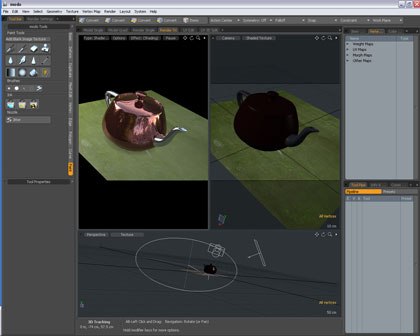
Perhaps the most significant addition to modo is the all-new render engine. This render engine does double duty by also facilitating a render preview viewport that updates in near real time. This preview is similar to LightWaves render preview and functions in a similar manner. The preset Render Tri view is especially handy as it sets up a camera, a preview render viewport and a perspective viewport as the largest of the three. This arrangement makes tweaking your render layout painless. The quality of the preview render is adjustable; users may choose to preview a full quality image or pick and choose from the usual options such as shadows, reflections, displacement and more. The preview redraws in increasing amounts of detail so that even after a change to your scene an approximation of that change in the first pass of the preview render. Producing a final rendered piece takes some more effort, as there is a wealth of options to set. Of course, this is both a blessing and a curse. The final rendering formula for every scene is always different so finding just the right mix can be a chore. Then again, without all the options it would be difficult to produce the precise image you have in mind.
While modo truly excels at providing tools that feel right to artists in much of the program, the rendering portion of the software is where this artist friendly paradigm falls apart some. This isnt a criticism of modo as much as it is of modern rendering standard. New users will find a learning curve here, but if you have experience with rendering in other 3D applications you shouldnt have any trouble. The render setting dialog is fairly standard, offering as much depth as LightWave, 3ds Max and Maya. The counterpoint to the setup for renders is the quality of the rendered images. The images are excellent. Users will find that for rendering still images, modo 201 truly competes with the big boys in final image quality.
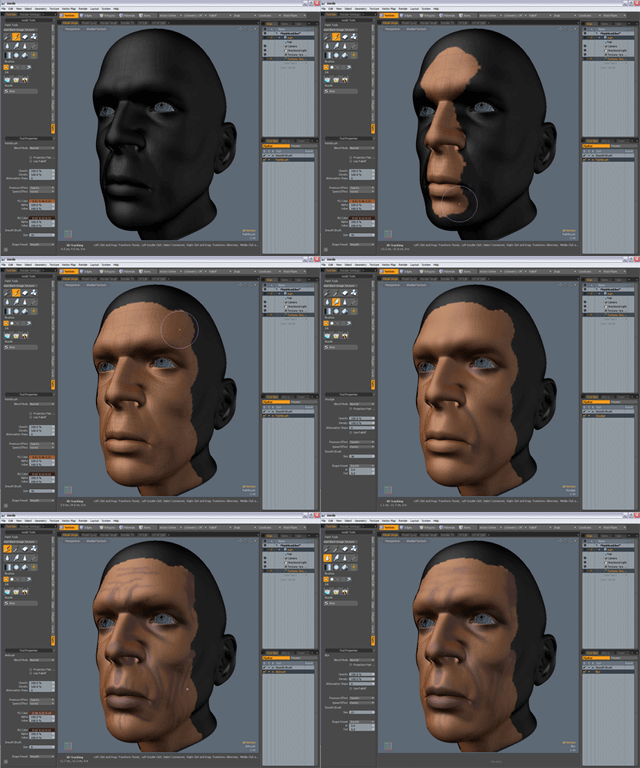
The new 3D painting tools are a major addition to modo 201 and practically worth the price of admission on their own. These tools just feel right, as if an artist was part of their development.
In addition to the previously mentioned new features, Luxology has included a plethora of tutorials, sample files and reference material. While the inclusion of this educational material is welcome, the formatting could be improved. The reference is offered in two formats: an html reference guide and a pdf user guide, which is more tutorial based. Navigating the user guide is straightforward, most likely due to its standard chapter-based PDF formatting. The reference guide, however, is not as easy to use. There is no search function and all navigation takes place in a left frame of your browser window. The content offered within both the user and reference guide is great, its just finding the information quickly that is a problem. Luxology has also included a multitude of video tutorials to help users learn modo quickly. These videos range in length from less than a minute to over ten minutes, covering a wide variety of topics. The videos get into some deep portions of the software and generally well thought, polished instructional tools. Thankfully, these are screen grab videos only, no geeky software developer showing off his tan.
Again, while the documentation can be a bit tricky to navigate at times, the software itself is amazing. Modelers will get up to speed and find themselves producing finished, high quality models in no time. With the new 3D painting and rendering tools artists are able to produce complete projects without having to leave modo for another app. There have been hints that Luxology plans to move into animation in the future. If they bring the artist focus to such future products, as they have now done consistently with two iterations of modo, we are all in for a treat. Given its low cost, 3ds Max and Maya users owe it to themselves to give modo a try. Files are easily imported and exported from modo so there are no translations issues.
modo 201 is available for download or shipped DVD copy from Luxologys website. Full versions, both download and boxed, cost $895. Upgrades are $395; once again, pricing for both download and boxed copies is the same. An added benefit for users who choose the boxed copy is a printed manual and the opportunity to download modo after paying online. Student copies are available for $149, as well as a lab pack with five copies for $695 for educational institutions. So called good students, those students with a proven grade point average of 3.0 or better, receive an additional $50 discount off the standard student pricing, lowering modo 201 to only $99 for them. Luxology has also promised a free fully functional trial version of modo 201 to be made available soon.
Fred Galpern is the art manager for Blue Fang Games, located just outside Boston. He is also a part-time Maya instructor at Northeastern University and a co-creator of the game development program at Bristol Community College. Since entering the digital art field more than 10 years ago, Galpern has helped ship more than 10 products and held management positions in several game and entertainment companies, including Hasbro and Looking Glass Studios. He began his art career in comic books and also has interactive, print and web graphic design experience.





