
Don't work in a studio or live next to a school but want to learn Maya? John Edgar Park offers a solution and reviews the best Maya training videotapes around.
You did it. You got in. You somehow managed to get onto the Alias|Wavefront Website and download the free Maya Personal Learning Edition! Congratulations, because I'm sure it wasn't easy.
Truth be told, Maya is wildly popular software, and the Alias|Wavefront servers didn't have a prayer of dealing with the zillions of animators clicking away at the 138MB download. Apparently, there were over 13,000 downloads in less than two weeks.
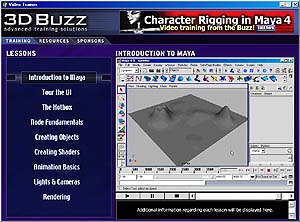
A shot from a training video by 3D Buzz. All 3D Buzz images © 3D Buzz.
But forget about the unfortunate ones who still haven't got Maya -- let's talk about you! You downloaded it. You installed it. You read through the documentation. You played around a little bit. Now what? Are you serious about learning Maya at home?
This is complex software. It can be difficult to learn, especially if you don't work in a studio with savvy colleagues to pester or live near a school that offers Maya training. One great solution for the stay-at-home Maya student is training videos.
Learn Visually
Videotapes can be an excellent training aid for people who learn visually and aurally. Videos straddle the fence between books and directed instruction. They aren't as random-access as books are -- it's nice to flip to any page and take as much time as you need. Nor are they as interactive as directed instruction -- politely raising your hand won't normally compel your VCR to call on you and answer a question.
The major benefit of training tapes is that they allow you to watch active demonstrations of concepts and techniques at your own pace. In reviewing these tapes I learned all sorts of great tips. It's like having personal demonstrations presented to you by a group of Maya masters.
Depending on your needs, you can get training materials for many different topics within Maya. (Most of these tapes apply to any version: Maya PLE, Maya Builder, Maya Complete or Maya Unlimited.) As you progress in your understanding of a given topic, you may also want to learn more advanced techniques. Thankfully, there are videotapes available for a wide range of skill levels.
We'll look at some training tapes (and related materials) from three vendors: The 3D Buzz, The Gnomon Workshop and Alias|Wavefront.
The 3D Buzz
Character Rigging I with Maya 4 is the first in a three part series from The 3D Buzz. Frankly, I can't wait to see the next two, because this one is terrific. It covers the step-by-step creation of a bipedal skeleton in a clear, easy-to-follow manner.
 If you have the Avi plug-in, you can view a clip from these 3D Buzz training videos now.
As an intermediate-level tape, you won't want to dive into it without learning your Maya basics first. However, once you're ready to try your hand at character setup, this tape is a must-have. You'll learn about joints, inverse kinematics, the connection editor, grouping, set driven keys, two different foot setups, custom attributes and expressions. The end result is a well-designed, easy-to-control rig.
One feature that extends the tape beyond your VCR is the 3D Buzz Website (www.3dbuzz.com). Once you purchase the video, you will be granted access to an online classroom forum, personal Web space to host a gallery, a download area to get the character model that is used on the tape, and more. (One note: the character model download is only available as a Maya Binary file. This will not open into Maya PLE.) While the classroom area isn't bustling with activity, any questions you have about the video will be answered by the knowledgeable lead instructor, Jason Busby.
Available on VHS for $49.95, and running about 2 hours, this one is a real bargain.
 A sample of 3D Buzz's homepage.
The Gnomon Workshop
It's difficult to think of a Maya topic that hasn't been addressed in a tape from the Gnomon Workshop. These guys have been busy! They have training videos covering the topics of Workflow, Modeling, Texturing, Lighting/Rendering, Animation, Character, and Effects. In most cases they offer a few levels of detail in a topic (i.e., Kinematics I - IV, Polygon Modeling I - II, Dynamics I - VII) for a total of 24 different tapes.

replace_caption_parkmaya04.jpg
The Introduction to Maya tape is a good starting point for the new Maya user. The material is presented concisely, and touches on all the major interface and workflow concepts. If you are brand new to 3D animation, you may need a more basic primer. This tape (much like the introductory tape from Alias|Wavefront) doesn't contain any introductions to 3D space, the Cartesian coordinate system, or "What is animation?" discussions. It instead focuses on teaching the software.
The other level-one tapes from Gnomon Workshop are equally informative and helpful. In many ways, there is no substitute for watching someone else go through the workflow you are trying to learn.
The NURBS Modeling I tape covers all of the basics of organic surface modeling. Drawing curves, revolving surfaces, creating image plane templates and manipulating surface components are all presented clearly. Even though it is a level-one tape, it goes into some more complex operations like trims and detaching surfaces.
The Texture Mapping I tape does a terrific job of unraveling the mysteries of shader networks -- if you follow along closely, you'll be able to create and render some very impressive looking images.
The Rendering I tape is a real stand-out. After a good primer on controlling one-, two-, and three-node cameras, the camera itself is fully dissected and explored. The interactive demonstration of focal length, film gate, resolution and film back is worth the price of admission alone. These can be very difficult concepts to grasp. The Rendering tape does a fantastic job of demystifying camera settings.

 Kinematics I from The Gnomon Workshop gives the viewer a thorough exploration of FK skeletons.
Kinematics I is a very in-depth exploration of creating FK skeletons. It covers all of the joint tool settings and related joint orientation issues you will face when building character skeletons. This tape will get you well on your way to building and posing FK characters, although it may take some rewinding to catch all of the information.
There are some moments on a few of the tapes where things get a bit confusing, or don't turn out correctly the first time. It would have been preferable if these had been edited for clarity, instead of being recorded in one continuous take.
Like everything technology-based, there is an inevitable obsolescence to contend with in producing training videos. As new versions of Maya are released, some of the techniques on the videos become outdated. Since the Website (www.the-gnomon-workshop.com) does not indicate when a tape was produced, it can be hard to know which version of Maya it refers to. While this isn't a major problem, perhaps these issues could be addressed through an addendum page on the Website.
If you are interested in a specific topic (I've only reviewed a small sampling here), and want lots of detail on it, you can't go wrong picking up a few of the tapes offered by the Gnomon Workshop. The presenters are experts in their fields, the examples are excellent (a picture is worth a thousand words), and the range of topics covered is tremendous.
Available on VHS, most tapes are $69.00 and run a little under 2 hours.
 Rendering techniques are de rigueur for animators. All Alias|Wavefront images © Alias|Wavefront, a division of Silicon Graphics Limited.
Alias|Wavefront
The materials available from Alias|Wavefront are the most varied of any vendor. It's a bit overwhelming to choose from the many tapes available on the Website (https://secure.aliaswavefrontstore.com/Main.asp). If you are looking for a one-stop shopping trip, check out the Maya 4.0 Ultimate Bundle. It is an impressive resource for learning the program.
$1,449.95 will buy you: 1. Introduction to Maya -- Video 2. Maya Rendering Techniques: Exploring Advanced Shading Networks -- CD-ROM 3. Particles for Visual Effects -- DVD 4. Maya Paint Effects Techniques 4.0 -- Video 5. Maya Modeling Techniques: Working with Subdivision Surfaces in Maya4.0 -- Video 6.Motion Tracking in Maya Live -- Video 7. Rigging for Facial Animation -- Video 8. The Art of Maya -- Book + CD-ROM 9. Learning Maya 4.0 -- Book + CD-ROM 10. MEL Fundamentals Courseware 11. Maya Rendering Courseware 12. Maya Cloth Courseware
(That's no small amount of cash, but keep in mind, this is about the same cost as enrolling in a Maya class at a private institution.)
The Introduction to Maya video is very similar to the Gnomon Workshop tape by the same name. In it, the interface and workflow are presented well, but it's the explanation of Maya's node-based architecture that really shines. This is accomplished both through digging into a shader network in the hypershade and by revealing the input nodes of a model in the hypergraph. This is a key concept to learn early on in your Maya training, and it is great to see it addressed effectively in the Introduction tape.
 This book offers advanced techniques in shading.
For intermediate to advanced shading, the Rendering Techniques CD-ROM is a must have. It contains step-by-step tutorials and analyses of 20 different shaders as well as their related data files. When learning about materials, there's nothing better than pulling apart someone else's shader networks.
 A frame from Alias|Wavefront's DVD on Particles for Visual Effects.
The most technically advanced of all these training materials is the Particles for Visual Effects DVD. This one may enlighten you on some aspects of the particle workflow, but without some serious scripting chops, you'll find it hard to keep up. The DVD format is great to look at on screen (especially compared to VHS), and there is a companion CD-ROM that contains project data files.
The Maya Paint Effects Techniques 4.0 video was presented as a seminar at Siggraph 2001. The video varies in quality from some unfocused moments to some brilliant insights. It is not meant to teach Paint Effects from the ground up, but rather to share advanced brush creation techniques. The sections on lighting and hair dynamics are particularly good.
The other three tapes in the bundle are more traditional training tapes. Working With Subdivision Surfaces, Rigging For Facial Animation and Motion Tracking in Maya Live all cover their topics in great detail, and shed light on advanced workflows. The Rigging For Facial Animation tape, in particular, unveils many great tips and tricks that will invariably improve your work.
The Art of Maya and Learning Maya books act as the backbone of the Ultimate Bundle, so read these first. The Art of Maya is a coffee-table style book with clear explanations of underlying Maya concepts. (This is the full version of the online documentation that came with your copy of Maya PLE.) Learning Maya contains a series of tutorials that teach different tools and techniques. While the tutorials don't always teach you how one element of the workflow relates to another, doing these tutorials will certainly help in your quest for Maya mastery.
 Step by step directions are featured in Learning Maya 4.0.
The last set of materials is the MEL Courseware, Rendering Courseware and Cloth Courseware. These are the curricula for the Alias|Wavefront certified classes by the same name. Essentially high-density textbooks for high-intensity classes, they are very informative, to say the least. The Rendering Courseware, for example, is an education unto itself on lighting, shadows, cameras, materials, textures and optical effects. It goes into fine detail on specific problems and solutions in the rendering workflow.
Now, $1,449.95 is a lot of money, regardless of the quality and quantity of the materials. What if you just can't invest that kind of money? Well, all of these videos and materials are available individually, as well. Prices range from $39.95 for most videos, to $395.95 for the Rendering Courseware.
Everyone has their own learning style and pace. If you like to learn by watching, I hope that you check out some of these training materials. You may find that the right combination of hard work and video assistance sends you on your way to becoming an expert Maya user.
John Edgar Park is a 3D animator, instructor and writer based in Los Angeles. He received his B.A. in Drama from the University of Virginia.





