
So, you want to work for a large television studio? Veteran television producer Larry Huber describes what you had better show him in order to get a job.
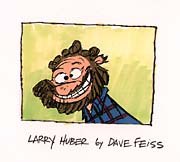
A caricature of Larry Huber by Dave Feiss, the creator/director of Cow & Chicken.
In the 25 plus years I've been a working as a professional in the business, I must have reviewed hundreds of portfolios. What I'm looking for varies according to the job I'm filling. If I'm hiring a storyboard artist, I don't need to see a lot of color work. If I need a background painter, character sketches won't get you the job. A little careful editing of your portfolio to fit the job you're being interviewed for, might save us both a lot of bother.
The television animation industry employs hundreds of artists, many of them filling specific classifications. You don't have to be good at drawing everything if you're just real good at drawing the something that fits the classification. So what are the typical jobs?
Storyboard:
This is a shot by shot illustration of the animated film. It is used to communicate as much information as possible to all the artists, overseas and domestic, that are working on the film. It includes background sketches, incidental character and prop designs, animation poses and all the necessary camera description. This is where the story is told and the basic film designed. It is a "Bible" for the animated film.
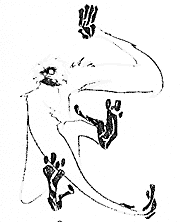
Animal sketches are always a good demonstration of expressive drawing. This primate is from the sketchbook of Carlos Ramos, a Nicktoons artist currently working on designing animated shorts for Nicktoons. © Nickelodeon.
Portfolio Requirements: A typical portfolio for this job would require examples of good drawing, some background and character design and many composition set-ups. Storyboards are generally done from scripts or detailed outlines so samples of completed or test examples of storyboards are necessary.
Background Layout Design:
Each scene of a storyboard becomes a layout, which is a detailed breakdown of the shot. Key character posing is drawn in proportion along with the necessary "props." The background elements are designed and labeled, often including mood rendering and light sources. All camera information is included, from the basic, "What field is this scene at?" to the complicated, "What's the degree of rotation on this pan?" Layout is no longer done domestically in television animation. Instead, it has been broken down into several classifications, including Background Design. No location, actual or fantasy, is exempt from animation, and the BG designer had better be able to draw it. Landscapes, seascapes, exteriors, interiors, mood pieces, day and night, outer space to the bowels of Hell is the realm of this artist.
Portfolio Requirements: Background drawings exclusively will got you the job if the examples are good and varied in style and location. Get your perspective, details and locale right.
Character And Prop Design:
From the principal players to the innocuous member of a crowd, the character designer must draw the right type in the proper costume. Characters are not limited to humans. Animals, fantasy monsters, elves or space aliens make up the roster of the animated cartoon. A "prop" is, generally, any non-living item that finds itself kicked, carried, thrown or moved during a scene. If it doesn't move, it's painted on the background and becomes the responsibility of that artist. Sometimes a prop can become a character (i.e. The candlestick and clock in Disney's Beauty and the Beast) and therefore, more detail must be paid to its' design.
Portfolio Requirements: Realistic and cartoon character examples should augment a solid life and animal drawing portfolio. Nudes are fine but costumed figures should be included. I'd rather see character drawings of your own design than copies of classic Disney or Warner characters. Prop drawings of cars, boats, aircraft and tanks are necessary along with mundane items like table settings, furniture and radios to secure a spot as a prop artist.

Prop and background artists should show samples of everyday objects in their portfolios. This is a lamppost as sketched by Carlos Ramos. © Nickelodeon.
Background Painting:
Know the difference between the gray-blue of a stormy sky and the blue-green tones of the ocean's depths? Can you paint with water colors or acrylics, control a wash and use an airbrush? Can you reproduce the texture of stone or the translucence of glass without resorting to a computer program? If you answered, "Yes!" to these questions, this might be the job for you.
Portfolio Requirements: Color, color and more color. Most background paintings are done "on the clock" so fast-drying mediums are the norm. Acrylics are the paint of necessity. If you are able to "paint" by computer that's "nice" but it must be an additional skill, not the basis of your work. Slides of your best work are okay but I prefer to look at good color copies or original material.
Color Key:
Originally done by the Background department, it is now a separate job. This involves choosing the colors of the characters and props, sometimes changing the palette between day and night. The colors of the backgrounds must be considered carefully when choosing the character palette. This is a hard job to get "right outta school." I usually hire professionals with examples of production work. A solid graphic arts portfolio with lots of examples of the good use of color in layout, background painting and character designs might get you a starting spot as a back-up artist.

"The best professional artists are those who can't stop drawing." These sketches by Carlos Ramos were made while observing a Tai Chi class. © Nickelodeon
Tips of the Trade
When bringing in a portfolio, make a selection of your best work. Don't bring in everything in the hope that my worst taste may lie somewhere in your drawings.
I like to see "napkin" portfolios. A sketch book tells me more about your ability than the senior project you spent six months perfecting. I like to see what you draw when you're having fun. Bring the doodles you do when you're riding the Metro-Rail or waiting to be served at a restaurant. The best professional artists are those you can't stop drawing. They draw well, they draw fast and they draw all the time.
However, I need to see that you have a range. Life drawings are useful but so are animal sketches. If you have more than one style, show it off. I'm not interested in seeing various techniques so important in publication art. Save the scratch-board stuff for the weekends.
I don't run an art school so you'd better know the basics of proportion, anatomy, perspective, vanishing points and the "golden mean." I hire artists and train them into specific, marketable goals in animation, but I don't teach life drawing.
Animation is booming. Talented, hard-working artists are in demand. A solid portfolio is the first step to getting a professional gig in the industry. Good luck. I hope to be seeing your portfolio soon.
View additional drawings from the sketchbook of Carlos Ramos.
Larry Huber is certainly a veteran of television animation. He started out in 1969 as an assistant animator at Hanna-Barbera, then worked for 15 years as a producer at Ruby-Spears, after working on features with Ralph Bakshi. He returned to Hanna-Barbera in 1990, and this year, moved over to Nicktoons, where he is executive producer on a new pilot series of animated shorts.





