
Brickyard VFX's Gina Downing provides a first-hand glimpse of how Autodesk Flare's serves as a companion to Flame and Inferno.
Junior compositors and Flame assists will agree that learning our industry's tools can come with its fair share of blood, sweat and tears. It's not uncommon for those just starting out to stay late after a 15-hour workday in order to hop onto the Flame after the lead artist goes home. This tough learning curve can be a barrier to entry for those interested in a career in VFX, and it takes a lot of persistence and hours spent on the box to finally feel confident and skilled.
So when the company I work for as a junior compositor -- Brickyard VFX's Boston office -- decided to add Autodesk Flare to its pipeline, I was excited about the opportunity to really hone my skills. Flare is Autodesk's new software-only companion tool for Flame and Inferno. Based on the Batch compositing environment, it has the same creative visual effects toolset as its pricier older brother, so you get the same powerful 3D compositing, advanced graphics, movie editing and client-driven interaction capabilities as Flame. The 2010 version contains such features as Action 3D compositing with support for third-party plug-ins and Autodesk Burn background rendering solution; creative tools for keying, paint, tracking, 3D text, color correction, warping and morphing; plus multiple Flare stations can be connected to Flame systems in a facility such as ours, allowing several projects to be worked on simultaneously.
We currently have five suites with dedicated Flare and Flame workstations that sit side-by-side. Since it's been up and running we've found that Flare has streamlined our workflow, increased our creative output and as the skillsets of the junior artists have grown exponentially.
Same Interface as Flame Perhaps the most noticeable thing about Flare is what you don't notice. Since it uses the same interface and feature set as Flame, assists will feel very comfortable with the system right from the start.
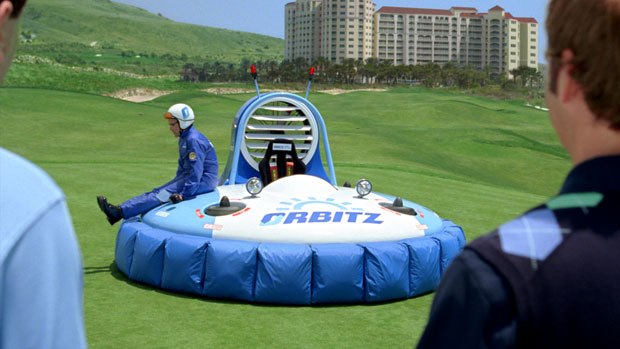
There are, however, some tools worth pointing out that surprised me with how powerful and versatile they are, such as the Modular Keyer. I'm in the middle of a job for an Orbitz campaign via Mullen Advertising, and in some of our shots the characters are standing in front of a blown-out sky. We still want to be able to catch all the intricate details, such as the hairs on their heads and all of their facial features. Hand rotoscoping frame-by-frame isn't going to capture all of that.
With the Modular Keyer, I can quickly key certain parts of the image, like the little bits of hair, and meld it all together in the MK setup. I can then hand off that setup to the lead artist with a perfect matte that catches every detail, not just a hard edge. The amount of control the Modular Keyer allows us is very impressive.
I also find myself turning to Flare's Paint tool more than I anticipated. Flare's Paint is an integrated Paint system designed for advanced motion graphics, digital matte painting, rotoscoping, wire removal and image retouching. The tool's great because it allows for working with multiple layers. I was able to test out Flare's paint capabilities on the Orbitz campaign when I replaced the background for a scene shot in front of the ocean and sky. As explained before, this was a case where we were dealing with footage that was quite blown-out, making it hard to see where the ocean and sky separated. In Flare, I used Paint to get my edges back in different areas after the sky had been replaced in Flame.
One thing that takes some getting used to in Flare is understanding the Timeline View. In Flame, we weren't using the timeline as much, although it was introduced some time ago. In Flare, all editing is done in the timeline, so whenever I've run into an issue or needed a workaround, Autodesk's The Area (http://area.autodesk.com/) has been a great information resource.
Designed for Interoperability Flare allows junior artists to work side-by-side with the lead artist, which enables better communication, and allows the lead to better supervise me and my work. Conversely, it's nice feeling empowered by the fact that I don't have to interrupt the lead whenever I want a progress update. Before Flare, we had a mixed pipeline, using non-Autodesk compositing tools that didn't integrate seamlessly with our other Autodesk systems (Flame, but also Smoke, Maya, Flint, Combustion and Backdraft). Now I can just check things out through Flare.
Working alongside the Flame stations also means we're speaking the same "compositing lingo," thus avoiding the mix-ups that can happen when you're using different terminology.
What I most like about Flare, however, is the seamlessness of everything. Technology today is changing so fast -- when you consider all the different software programs we use on a daily basis, from Photoshop to QuickTime formats and codecs, it's mind-boggling to think that we probably use 50 different software programs during the course of the day. Constantly learning new interfaces as new versions of these tools can take a lot of time. With Flare, we don't have to learn an entirely new language.
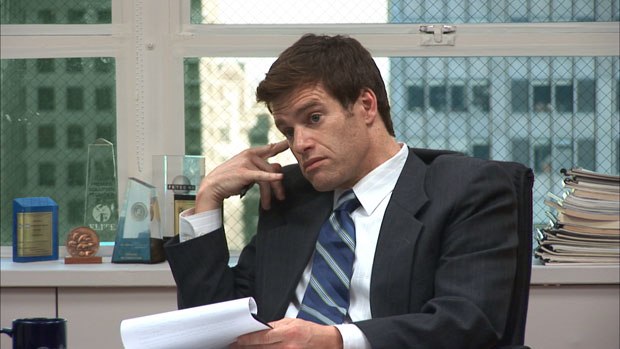
The Truth Campaign Gets Some Flare On a series of spots for the Truth campaign that depicted job interview scenarios, we were tasked primarily with doing color correction in the Flame. Thus, the assists needed to cut lots of mattes so we could color correct the people separately from their office setting. And because the spot was shot in front of windows, we also had to color correct the windows differently. There was a lot of rotoscoping going on in this spot.
Our workflow involved parceling out all the shots to the four assists working on Flares, where we spent most of our time cutting mattes and creating keyer setups. Because Flame and Flare are designed to work together, having the combined power of these two tools made huge timesaving improvements to our workflow. Our senior compositors used our keyer setups to drop into a batch and do all the color correction in this node-based workflow setup, so we created our own version of this batch setup on our Flare station. As we were rotoscoping, we could really quality-check the work using the same setups that the lead artists were using.
If we were on another compositing system, we could approximate but they wouldn't be the exact setups -- thus leading to further work and tweaking within Flame. With Flare, we save the keyer setups to the lead artist's machine, and he takes that setup and loads it right into his batch and voila, it's done.
The Final Word Flare only just launched in April at NAB this year, but for being right out the gate, it's a powerful addition to your toolset that will maximize the artists in your facility and enable them to work at their best. There's not much I would improve upon in the next version, but one addition I'd love to see in Flare 2010 would be enhancements to help use batch as a desktop, like a more comprehensive reset button.
But I would wholly recommend Flare to facility owners who have great lead artists they want to utilize more fully. It's a cliché that time is money, but it's even more of a business mantra these days now that VFX and post vendors are working with more limited budgets, yet the demand for quality work hasn't changed.
Flare's also great if you want to develop the creative skills of your junior artists. With Flare, I'm learning the right tools to get a leg up in my career. It can sometimes be frustrating as a junior artist because you have to put in the extra time and effort just to get on the machines and finally understand what all the other artists are talking about because you don't have that screen in front of you all the time. With Flare, junior artists can figure things out so much faster and get a good working knowledge base without having someone constantly sitting over their shoulder pointing out how to do something every step of the way.
Gina Downing is a junior compositor/Flame assist at Brickyard VFX/Boston. For more information about Brickyard VFX, visit www.brickyardvfx.com; for more information about Autodesk Flare, visit www.autodesk.com/flare.





