
Karen Raugust investigates how comic publishers are using new technology to market their products to new audiences.

NewTek, the developer of LightWave 3D, must have quite a bit of marketing know-how. After all, they released LightWave 3D [8] this past spring and artists around the world stood in line for hours to buy the new version. Oh wait, sorry, that was Doom 3. I hope this lame attempt at humor illustrates my point that LightWave 3D [8]'s release was greeted with practically zero recognition in the 3D community at large. In fact, NewTek's own Website did not mention that the new version was shipping to customers who preordered. Some customers received their copies the first week it actually shipped, while others waited at least a month (I know this from a co-worker). I don't mean to be overly critical of NewTek here, and only mention this flawed marketing strategy in regard to other major new 3D application releases, especially full version upgrades. Usually, the online 3D community reacts to a new release with full reviews, ads and significant activity on the message boards.
As I write this review, months after LightWave [8] shipped, none of this expected marketing has appeared. Sure, the message boards have taken notice, but where is the push to expand their user base? NewTek should take a close look at what Alias and Discreet have done with the branding of their 3D apps. Maya and 3ds max could hardly have more cluttered and unappealing interfaces, but when they launch new versions they say something to their users and prospective new users. The branding of these big hitters tells users, "This 3D program is sexy, cool and hip and you must have it!" Isn't creating appeal for a product a foundation of effective marketing? Regardless of their marketing plan, LightWave [8] is finally available and I'm happy to report, it's an excellent upgrade.
Many of the requested features LightWave users have been asking for have been delivered. The new dynamics system deserves a special mention as well. LightWave [8] still utilizes a hardware dongle, something, which I'm uncertain about. On the one hand, a hardware dongle is easy to use and doesn't rely on an Internet connection to setup. On the other, a hardware dongle uses up a USB port, is easily lost due to its small size (it's about the size of a USB thumb drive) and in this case, still requires the user to go online to authorize the application. I think it's time for NewTek to move on from hardware dongles and use a software key. Radical as it might seem amongst the major 3D apps, NewTek might even consider going with a simple serial number and do away with the fancy dongle and authorization schemes.
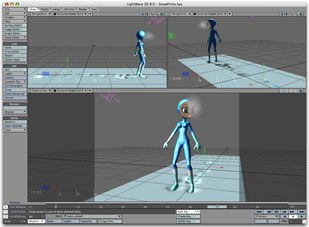
Previous LightWave users will be right at home when they first launch LightWave 3D [8]. The familiar tabs and buttons interface has not been changed much, although there have been a few new items added. I have always customized my interface so these default tabs and buttons are really just a suggested setup from NewTek. Customization of the interface hasn't changed from previous versions; tabs and buttons can be altered to include or exclude just about every feature. The tabs and buttons approach leaves much of the screen free for users to see their work. As mentioned earlier, Maya and 3ds max both have extremely cluttered interfaces. Sure, these can be customized as well, but they don't take the minimalist approach LightWave does from the start.
Workflow has not changed in any radical way. LightWave [8] maintains the dual application approach of previous versions divided between Modeler and Layout. This separation is one of the things the LightWave community has always been divided on. I'm in the separation camp. Having my modeling separated from animation helps me keep the work divided mentally. I imagine that in some future release LightWave will conform to the industry standard single app, but for now we have the old familiar LightWave approach. Changes are still updated between apps by the LightWave Hub, which resides in your windows toolbar.
Basic modeling is also familiar and largely unchanged in LightWave [8], which is a very good thing. Modeling in LightWave has always been fast, intuitive and precise. Creating organic objects and characters is straightforward, as is the approach to subdivision surfaces; the easy to use SubPatch mode (or as most say, Tab mode, due to it being called by the Tab key). Unfortunately, subdivisions have not been upgraded in any way. Hopefully, in a future release NewTek will move beyond the current three or four-sided polygon limitation. One benefit of this limitation is that it forces model builders to construct their models carefully and follow good form. Layers are intact from previous versions. NewTek's implementation here is hardly as elegant as a Photoshop-style layers palette might be, but it gets the job done. Primitives take up the first section of the default Create Tab Buttons, which also includes Points, Polygons and Text. NewTek has also chosen to keep its alternate modes, allowing the user to globally work with points or polygons. This is somewhat limiting when compared to 3ds max, which allows the user to choose to work on points or polygons on a per object basis. However, I applaud NewTek's decision to remove the Volume selection mode from the main interface, as it was rarely useful (if there are any Volume mode fanatics out there, don't worry, the mode can still be accessed from a submenu). Text is handled well, allowing a large portion of the LightWave user community to continue flying their sparkling logos for news, sports and other flashy media. Numeric entry hasn't changed; architectural types will find adequate tools, although I suspect 3ds max users have an easier time with these kinds of projects. NewTek mentions new modeling tools in their press releases, but I didn't see anything significant.
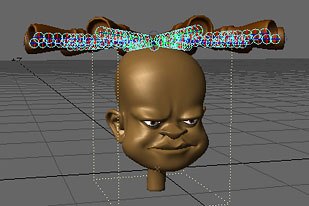
Layout has received the most attention and it shows. The single most significant change may seem trivial at first but should not be underestimated. This change is the addition of multiple undos. Sounds kind of old fashioned doesn't it? Well, believe it or not, multiple undos have been missing from Layout all these years. Animators resorted to some ingenious workarounds but no more, layout now offers seemingly unlimited levels of undo. This essential addition comes with a curious warning. You have the option of either specifying any number of undos or checking a box for "Unlimited Undo," which calls up a stern warning, with a foreboding claim of system instability. However, when I set it to somewhere around one billion, I received no warning. This seems odd. Two peculiarities in one, but it is the first iteration of this function. As with much of LightWave, there's room to grow.
Surfacing is improved in LightWave [8], but not a great deal. The best new Surfacing feature is the ability to make global changes to surfaces in the dope sheet. This access is especially useful when coordinating an animated surface with the movement of an object or character. Imagine animating a bird flying over a school of fish, where the fish are merely a scrolling texture. Changes to the bird's flight path are now easily matched in the fish texture by making the changes all within the same dialog box. The two elements are separated by a tab, not an ideal setup, but still superior to 3ds max's daunting Track View.
The new dynamics system in LightWave [8] is quite nice. Hard, soft and cloth dynamics are all well handled and fairly easy to use. I was able to create a flag and animate it waving in the breeze in just a few minutes, with little instruction. Speaking of instruction, NewTek has also given LightWave users an online Help system, something once again surprisingly missing from previous versions. The online manual even saves users who elect to forego a printed manual a full $100. A nice savings considering this $100 might be better spent on one of the many tutorial books already available for LightWave [8]. In fact, as I write this, NewTek has just announced a special bundle that includes many of these books. More apps should follow NewTek's lead here. OK, back to dynamics; gravity, wind and collisions are also easy to setup and adjust; plus, the new dynamics system allows bones to interact with other dynamics. This is very cool and new to LightWave. Imagine a superhero flying, his cape flapping through the air, while he smashes through a brick wall that breaks into pieces. All of this is computed (fairly quickly too) when you use LightWave's dynamics; all the user has to animate is the flight path of the superhero. Another benefit of bone dynamics is rag doll effects. Thanks to the new bone dynamics, these can now easily be achieved in LightWave.

Rendering is largely unchanged from previous versions. This is one of the areas where no change is a good thing. LightWave has always had an excellent renderer that draws at a respectable speed.
Overall, LightWave [8] is a satisfactory upgrade. For new users, LightWave still remains the app that is fastest to learn. For experienced users the modeling and rendering are still some of the best around. Getting from one to the other, though, leaves a wide gap. I do recommend LightWave [8] to new users. I teach 3D part-time using LightWave in my general classes. I don't recommend for Maya or 3ds max users to switch over to LightWave. It's not that game development, broadcast graphics or visual effects can't be done in LightWave, but rather there isn't a large enough community built up around it. I understand that in Japan LightWave is the 3D tool of choice, but it is clearly an underdog here in the U.S. I sincerely hope that Newtek finds a way to get LightWave noticed. With version [8], LightWave 3D remains a great program, with an excellent workflow, decent stability and an excellent renderer.
Special Note
Just before I submitted this review, NewTek announced the release of LightWave [8.0.1], and has posted the patch on their Website (www.newtek.com). I haven't had too much time to work with this update, but I can say with confidence that Modeler is much more stable, not crashing at all during my six-hour modeling session last night. Layout also seems more stable, although I spent considerably less time using it. NewTek promises many additional updates beyond stability, a list of which can be found here: http://newtek.com/products/lightwave/downloads/updates/lw801.html. As with all updates, NewTek strongly advises users to back up all content before updating.
Fred Galpern is currently art manager for Blue Fang Games in Waltham, MA. Since entering the video game field five years ago, Galpern has held management positions in several other game and entertainment companies, including Hasbro and Looking Glass Studios. Originally a comic book creator (he was creative director on three top-selling comic book titles), Galpern also has experience in various graphic design fields, including print, Web and multimedia, and has done character and story development for children's television series. He has satisfied his long-standing interest in education by teaching at several New England colleges, including Bristol Community College, where he created the curriculum for, taught in and still advises the Electronic Games certificate and associates degree programs.





