
Alain Bielik discusses the challenges of creating a unique lead dragon in Eragon with first-time director and former ILM vet Stefen Fangmeier and various supervisors.

First-time director and former ILM vet Stefen Fangmeier made the design of Saphira a priority. The result is a dragon that doesn't look like any other in movie history. Photo credit: ILM. All images & © 2006 Twentieth Century Fox.
&atypeDragon movies have never been a filmgoer's favorite. From Dragonslayer to Dragonheart to Dungeons & Dragons, this genre has always disappointed studios and producers alike. With Eragon (opening Dec. 15), Twentieth Century Fox is hoping to do to dragon movies what Disney's Pirates of the Caribbean did to the pirate movie genre. The studio is betting that the source material, a worldwide best-selling novel by Christopher Paolini, will be popular enough to lure moviegoers into theaters.
Helming the epic production was first-time director Stefen Fangmeier, a former visual effects supervisor at Industrial Light & Magic. "There were multiple challenges for me, as it was a dragon movie, and a period movie, and it featured large-scale battle scenes, and the lead actor had never done a movie before. My priority was to design Saphira, the dragon. I worked with the design team at ILM over a period of about six months, testing various approaches. We finally created a shape that we were all happy with, a strong dragon with a very powerful head and feminine blue eyes. At this point, the wings were bat-like, but when we showed the concept to the studio, they said that they really liked the wings of Angel in X-Men: The Last Stand, which they were producing at the time, and could our dragon have feathered wings? So, we revamped the concept to incorporate scaly wings, which took the whole design away from reptilians. In the end, it was a good thing as our dragon doesn't look like any other dragon in movie history."
At ILM, visual effects supervisor Samir Hoon was initially assigned the whole project, but when the vfx shot count increased dramatically during post-production, Weta Digital, Cinesite, CIS Hollywood and other vendors were brought in. Michael McAlister joined the production as overall visual effects supervisor to coordinate the global effort. ILM ended up producing about 215 shots, all of them featuring the dragon. The team there included vfx producers Gretchen Libby and Jeff Olson, animation supervisor Glen McIntosh and digital production supervisor Michael DiComo.

At one point in the design phase, Saphira's wings were bat-like, but the studio, inspired by the wings of Angel in X-Men: The Last Stand, requested feathered wings. ILM revamped the concept to incorporate scaly wings. Photo credit: ILM.
Conveying Emotions
Although ILM had just created a dragon for Harry Potter and the Goblet of Fire, the challenge of creating Saphira was of a completely different nature. 'To start with, the dragon in Harry Potter was bipedal, while Saphira was a four-legged character," Hoon says. "Plus, Saphira was a real character, not a mere creature. She had to communicate with Eragon telepathically, meaning that we had to convey all her emotions through facial animation only. She was basically delivering dialog without really talking. Also, we had to deal with a highly unusual skin color... " In the book, Saphira is described as a giant blue dragon, a nice concept on paper, but a tough one to translate on screen. "We worked on the skin color a lot, trying to keep it blue, but still tweaking it to make it believable," Fangmeier notes. "There is no large animal in real life that has a vibrant blue color. We had to find just the right skin color, a subtle hue that would allow Saphira to appear in scenes that were lit in warm tones and not stand out. It was a real challenge."
Saphira was modeled and animated in Maya. "We needed to have the detail of small overlapping scales over Saphira's surface that would have made the geometry too heavy if modeled," CG supervisor John Helms explains. "So, we used a combination of painted textures and shading to directionally displace scales from her surface, so that even the smallest scales overlapped. Her skin had subsurface scattering, and her eyes had the same type of work that would have been done on a digital human." The tricky part was finding a way for the wings to fold up in a pleasant manner. Some times, the geometry wouldn't fold up properly or the scales would end up creating messy intersections. "We did cheat a little bit, once in a while," Hoon smiles. "What you don't see doesn't hurt you, right? So, we just had a modeler go in and clean it up. When Saphira was flying, since she was not moving her wings a lot, we had simulations running on top of the wings and on the scaly feathers, just to keep them alive." A completely different model was built for the hatching sequence.
During principal photography, the crew used simple cutout shapes to represent the dragon and help the cameramen and actors to visualize the character. For shots in which a human character had to be seated on Saphira, the crew used the motion rig that had been built at Pinewood Studios, England, for the Hippogriff sequence in Harry Potter and the Prisoner of Azkaban. "We had extensive previsualization of all the flight scenes," Hoon adds. "We first animated the dragon and established the camera move in the computer. Then, on the bluescreen set, the dragon animation drove the motion rig, while the CG camera drove the motion control system. So, the actor followed every move that the CG dragon made, which allowed us to blend CG animation and live action very precisely. This technique was used for complicated shots in which Saphira and Eragon needed to be 'locked.' For simple flying shots, we animated a generic flight cycle that was used to drive the motion rig. The actor was then shot without motion control, which gave us more latitude to adjust the animation and compose the shot."
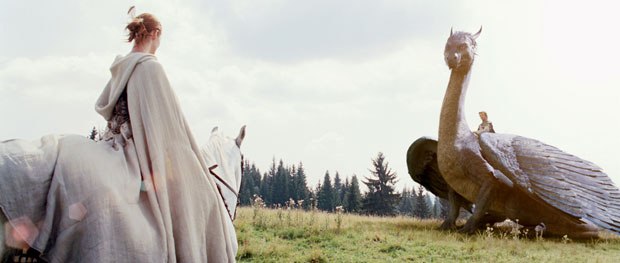
Finding a way for Saphira's wings to fold up well was a challenge. Sometimes the geometry wouldn't fold up properly or the scales would end up creating messy intersections. Photo credit: ILM.
The flight sequences feature aerial backgrounds shot from a helicopter in Eastern Europe. The plates were stitched together to build a 360° tiled panorama. This image was then broken down into different depth levels to create parallax effect. Projection techniques eventually turned it into a 2 1/2D environment. This approach was first developed on Star Wars: Episode III and has since become a key asset of proprietary software Zeno, ILM's main tool for lighting, secondary animation and simulation. The shots were rendered in RenderMan, with some ambient occlusion passes and specific renders being handled in mental ray.
Sharing Character Animation
In March 2006, Weta Digital was called in to realize the final battle sequence, and several other dragon sequences throughout the movie, eventually producing more than 200 shots. The core team included vfx supervisors George Murphy and Guy Williams, animation supervisor David Clayton and vfx producer Kathryn Horton. In the end, Saphira was created both by ILM and Weta Digital, which could have presented a serious risk in terms of continuity. This ended up not being the case as Weta mostly dealt with an armor-clad, combat-oriented Saphira in nighttime shots, while ILM focused on the emotional aspects of the character in daytime drama-oriented shots.
Weta started by adapting the digital assets provided by ILM. "We had to completely re-rig Saphira to work within our pipeline," Murphy notes. "We created material shaders and lighting schemes that would maintain a consistent look for her. This was made challenging because our nighttime battle shots presented Saphira in a completely new lighting scheme. We found out that, when you put a blue dragon in yellow firelight, it turns black! At the same time, her yellow underside glowed... These kinds of realities forced us to customize Saphira's texture and shader components to give us the kind of control we needed to adjust her look on a shot by shot basis. Further adjustments in Saphira's physical model were dictated by the needs of her animation and character performances. Certain extreme poses would sometimes cause major intersections in her wing geometry. Often, we could solve this with sculpting the geometry on individual shots, but certain favored poses regularly broke the dragon. So we went back into the modeling and made some fundamental changes to the way Saphira's wings attached to her body. This is a good example of a change that developed within Weta's workflow that was pushed back to ILM for matching."
Maya was used for modeling, with Mudbox being employed to enhance sculpted details. While rigging was also done in Maya, it was primarily realized through proprietary extensions. Other internal software was used to drive muscle and skin systems, and to generate hair. StudioPaint and Photoshop were employed to generate or modify texture maps, with the latter the primary tool used for the creation of digital matte painting elements. While these textures were 8-bit, displacements were calculated in float. Shake was the primary compositing tool, though Nuke played a key role in staging 2D elements in a proper 3D camera space. Nuke was also used to project matte paintings onto 3D geometry for integration into the synthetic Varden crater environment. Rendering was handled in RenderMan.

Weta Digital was called in to realize the final battle sequence, and several other dragon sequences throughout the movie, eventually producing more than 200 shots. Photo credit: Weta.
Matching ILM's Dragon
From a creative point of view, Saphira proved to be a very touchy CG character to maintain. "There was a high level of detail in both the color maps and secondary maps that drove various octaves of bump and displacements, and how the skin materials responded to specific types of lights," Murphy explains. "The way these came together varied considerably depending on the camera's distance to the dragon and the nature of the lighting scheme. We found ourselves involved in an ongoing process of refinements, tuning both texture maps and material shaders as the visual target for Saphira continued to evolve. We devoted a lot of attention to her face and eyes. This was where we would get caught if Weta's version of Saphira and ILM's version did not match. Some of our daylight shots forced us to take a step back and go through a secondary round of development to align our Saphira more closely with ILM's versions. We had made choices intended to help Saphira look good in her armor and in the contrasty lighting of moonlight and fire, while ILM's Saphira had concurrently evolved to suit their needs. This initiated another round of handoffs that had us folding updated face shapes from ILM into our animation pipeline to work with our own latest sculpt of Saphira's head and neck."
Much of the fire was created by layering 2D live-action footage of fire and smoke elements. This included the ground fires from the Varden battle, but also Saphira's fire breathing scenes and the fireball thrown by Saphira during the aerial battle. These were integrated with the non-interactive, live-action fires from the Varden location plates. The buildup of ground fires as Saphira torches lines of warriors would involve dozens of layers that used 3D locators to track them correctly within the volume of the scene.

In the battle sequence, the fire was created by layering 2D live-action footage of fire and smoke elements. Photo credit: Weta.
During the battle, Saphira confronts the Beast, a formidable creature partly concealed in trailing smoke. "The model that we received from ILM was still in an early stage, so we took over the task of completing the build," Williams says. "We started by adding more detail to the exposed areas (the areas not obscured by smoke). We did this using Mudbox and extracting the point deltas into float displacement maps. For the smoke itself, we decided to break the effect into three distinct layers.
"The first layer is the point of emission. It uses hairs with dynamics anchored to the surface. We then lofted a bell shape down the tube and emitted particles from the point of contact with the surface. As the particles traveled away from Beast, we goaled them to the surface and eventually let them fly free. This gave us a great sense of smoke cascading from small fissures in the surface. The system, however, was pretty heavy in its particle count. To pad out the number of tendrils needed, we used our in-house hair tool with dynamics. Instead of lofting a 3D shape along the hair and emitting particles, these new tendrils had a texture of smoke flowing down them. We did about 60 tendrils with full on particles, and the other 200 or so were done with textured hairs. The second layer was the main body of the black cloud being emitted. We created this layer using particles emitted from the surface of the creature along opposing noise fields. They were then rendered using deep shadows and transparency to give it a true volumetric feel. The third layer added in a layer of debris falling away from Beast. This was meant to give it the impression that the creature was always eroding away."

Saphira's fire breathing scenes were integrated with the non-interactive, live-action fires from the Varden location plates. Photo credit: Weta.
A Massive Battle Scene
Crowd simulation engine Massive played a key part in the creation of final battle sequence, which takes place around a fortress in the crater of a volcano. "We used Massive to add the armies to the all-digital shots of the battle," Williams adds. "For the fighting armies, we employed our standard sword fighting brain, and simulated two armies fighting each other. This brain used motion capture data from our motion library. The simulations were then rendered using our in-house crowd renderer, GRUNT." Throughout the sequence, the crater environment is either a combination of live-action and set extensions, or entirely digital. The majority of the crater was handled as a 2-1/2D matte painting projected onto the walls of the digital crater. The fortress was also built in full 3D, allowing Weta Digital to run destruction simulations. The buildings were built to a high level of detail, and textured using a procedural building shader. Then, the team used an in-house particle weathering software written by CG supervisor Chris White to add decades of grime and dirt. Around 500 lights were employed to light the environment.
Four weeks before the deadline, Weta was asked to produce an ambitious shot featuring no less than 13 dragons! "It was the opening shot where the back story of the age of dragons is revealed," Williams recalls. "We fly down into an epic battle where dragons are raging against each other and the land below. We found two different plates -- a sky plate and a flight down through a valley -- that we blended via digital clouds. We then added a few dozen columns of smoke and fire to the valley plate. Compositing dealt with the interaction of the dragons into the smoke plumes as well as the fire breathing from the various dragons."
A Low Key Epic
Ultimately, Eragon features about 500 shots, a remarkably low shot count for an epic movie featuring a dragon as one of the lead characters. "I learned a lot from Steven Spielberg," Fangmeier concludes. "In Jurassic Park, we did only 55 CG animation shots, but you left the movie thinking you had seen many more than that. That's what I tried to do with Eragon."
Alain Bielik is the founder and editor of renowned effects magazine S.F.X, published in France since 1991. He also contributes to various French publications and occasionally to Cinefex. Last year, he organized a major special effects exhibition at the Musée International de la Miniature in Lyon, France.





