
A distinguished artist test drives the latest from Wacom.
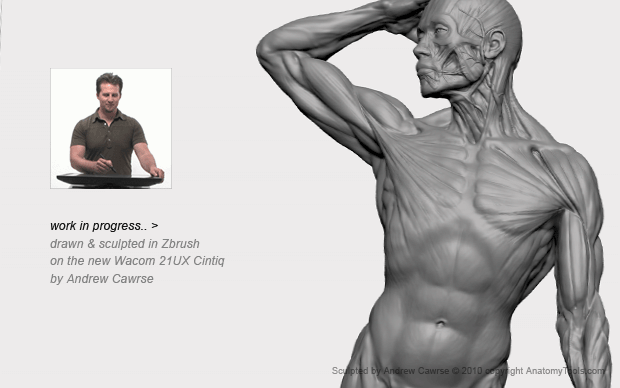
Arguably the big challenge and frustration for the artist using a computer, is the visual and physical disconnect, between using an LCD monitor with a completely separate input device, whether it be a mouse, keyboard or tablet. With the new 21UX Cintiq, however, those days are finally over!
As an artist, you will really appreciate that this technology gives back your creative workflow. First, by allowing the immediate eye to hand co-ordination, by working directly on your digital art surface; second, providing the subtlety and intuitive expression you want because you finally get the super-sensitive feedback and control of more traditional mediums. Adding to this, hotkeys, keyboard and software specific functionality, the Cintiq can effectively combine your canvas, keyboard, display and mouse all into one -- it's a powerful combination.
Made by Wacom Technology, the natural advantage of the Cintiq, is that it combines an LCD screen and a pressure sensitive tablet to create a surface you can digitally draw, model & paint directly on, using a Stylus pen. The 21UX, however, is a big jump from previous Cintiq models with significant upgrades, as well as new industrial and ergonomic advancements.
I tried three major software programs as test subjects, Photoshop, Painter and ZBrush. I hope this will cover enough range for you to compare your own work-flow against. Review comments apply to all three of these programs unless otherwise mentioned.

Display
Unlike most tablets on the market, the 21UX has a large 21.3-inch display, comparable to a good size drawing pad, allowing full range of arm movement, a blessing both artistically and ergonomically. It slides off easily from its fully adjustable desk-stand, so as you see pictured you can have it on your lap pretty comfortably and just create away. I have been sitting recently on my couch drawing with it. Only caution is it's a little heavy to lift off its stand initially, and be sure to not pinch or rest the rear chord against any hard objects. It's best to return the display back to its stand when not in use.
The screen is at a 4:3 ratio (which suits me), and for those of you who like doing wide view landscapes or cinematic proportions, where this may appear to be less than ideal, the interactive zoom, pan scroll functions make this a minor issue. You can also mirror your desktop to another wide screen monitor to overcome this.
Enhanced Pressure Sensitivity
The big plus, however, to the display is the increase in pressure sensitivity: the previous Cintiq registered from a delicate 10 grams of force & up (which was already pretty sensitive); amazingly, the 21UX registers now from only 1 gram of force. I really noticed an improvement in thick to thin drawn line quality and sculpting subtlety.
Smudging Your Screen?
Depending on the amount of natural oil in your skin, and environmental conditions, if you work with the fleshy pad of your hand against your drawing surface, you might like to also wear a thin fabric glove while working on the Cintiq. This allows your hand to slide effortlessly across the glass, and keep your screen clean. You can cut off the thumb, first and second fingers in the glove if you like to grip the pen naturally. I discovered the other day that you can actually buy these gloves specially made for this purpose at smudgeguard.com, so I guess I'm not alone in seeing this benefit.
Stand
Very cool stand. It allows your display to be upright like a normal monitor, or lie almost flat for drawing directly over it. The stand also allows for +/- 180 degrees of rotation to turn like a canvas / sketchbook when working. The best range of rotational movement is when the stand is laying flat.
There are also permanent mounting brackets you can attach the Cintiq to other mounting options, like swing arms etc. I also added to this by cutting a hole in my much larger adjustable drafting table and I sometimes sit the Cintiq flush in it, held by a rear cradle.
Word of warning, though: re stand position. When spending hours using the Cintiq doing artwork, unless you like holding the stylus traditionally by the end, and at arms' length, you may want to work with the monitor lying down to avoid crimping your wrist, as this can cause RSI. However, as a general statement, in my experience the Cintiq can prove to be far more ergonomically beneficial than regular computer setups.

Stylus Pen
The Grip Pen is the same as all Intuos4 Wacom products, but it is important to remember that has 2 x times the sensitivity of any of its competition or previous models. It is this fact, combined with the new display sensitivity, why you can get so natural looking fall offs, thicks and thins to your drawing, and real control in painting and digital sculpting.
But it is critical that you take the time to setup your pen to suit you, by using the "Wacom Tablet Properties" utility, which ships on an installer DVD with the product.
The stylus performs beautifully in photoshop, but really capitalizes on programs like Painter which have extra pressure sensitivity feedback and adjustment preferences - set this as one of your express keys, so you can adjust to type of work or even how much energy you have to apply pressure.
The 21UX & pen combined made a big difference for ZBrush, and I was surprised to find it comfortable to draw more like SketchPad, which was great for me as I have only really used it as a 3Dprogram
Tilt Angle
Tilt Angle allows you to hold the pen classically like charcoal of a paint brush. I hold it like my sculpting tools at arms' length, even when drawing.
Duo Switch
Let's talk about the rarely utilized duo switch: this really can be powerful in assigning functions and mouse button equivalents to, in combination with the express or shortcut key; therefore, to restate, you rarely need your keyboard.
Eraser
The pen can be flipped to utilize the pressure-sensitive eraser on the end: use like you would a traditional eraser.
No Touch Necessary
The pen also allows you to hover from 5mm off surface to activate programs, desktop functions etc. without the need to actually touch the pen to the screen
Pen Holder
The pen holder has a surprise internal container with six standard nib ends, one special stroke nib and three felt nibs.

Setting up for Software
The 21UX will work with any software as a stylus/mouse, but it will more importantly utilize any program that has pen/pressure sensitivity built into it. You will see from the image above I have settings for Painter Sketch Photoshop & ZBrush assigned in my Wacom utility.
Express Keys
16 Express keys offer shortcuts to common tasks; I map all my keyboard shortcuts to these keys.
Dial
By pressing the dial it cycles through x 4 touchstrip functions. By default, these are auto scroll/zoom, cycle layers, brush size and canvas rotation, but, again, I customize these based on which software I am using.
TouchStrips
These are an interesting solution for giving adjustable scaling solutions for certain functions, with the touch of your finger. You slide your finger up and down on the strips and it will provide a scaling function between two ends of a purpose, like making brush size bigger or smaller, opacity 0-100%; however, on the 21UX these are now rear mounted, which prove to be more ergonomically suited to your hand, and also help avoid you brushing them by mistake.
Conclusion
I have been a fan and user of Wacom tablets for years and the upgrade to a Cintiq in the past was extremely tempting, but still for many considered a luxury. But now, after creating on the new Cintiq and experiencing the speed, control and sensitivity it provides, you too may realize that it is an absolutely invaluable investment, and you simply can't go back to working any other way.
Andrew Cawrse is founder and director of Anatomy Tools.com, and has had a distinguished background in design and movie visual effects, with more than nine years at Industrial Light & Magic as a model supervisor and digital concept sculptor. His effects work has been featured on Avatar, The Spiderwick Chronicles, Van Helsing, Dreamcatcher, Star Wars Episode I & II, Mission to Mars and Galaxy Quest. He was also a technical consultant on Pirates of the Caribbean II.





